Creating a Doc Site
To create a new doc site, there are a number of items you need to set up before you can start adding content.
Prerequisites
Instructions
Here's how to create a new doc site.
- Open a web browser and access the Arundo project in GitHub.
-
Create a repo for the doc site.
- Add the repo with a
READMEandMITlicense. - Add a description that explains the usage of the docs.
- Add the repo with a
-
Open GitHub Desktop.
- Clone the new repo you added to your local device and fetch the content.
-
Open the arundo-docs-theme repo, download it to your local device, and extract the files into the local directory for the new doc site.
- Select to skip replacing the
READMEandLICENSEfiles.
- Select to skip replacing the
-
Open the local directory of the new doc site in a source code editor.
You should now see the following folders and files.
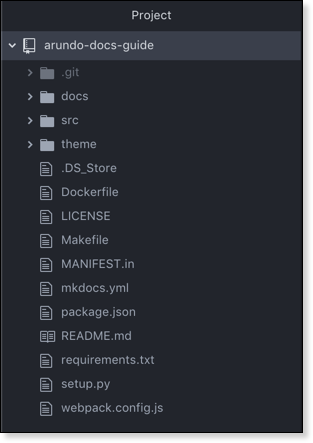
-
Move back to GitHub Desktop and make sure the doc site is selected as the current repository.
- Commit the changes to
master. -
Push the changes to origin.
The doc site skeleton is now built and saved to GitHub. You can now add and remove content in the
docsfolder as necessary. -
Open the DevSecOps board in Jira and add a ticket to create a static web app for the docs site in Azure.